Hill Climb Racing 2
Burger Please!
Asphalt 8 - Car Racing Game
TikTok
Woodle Screw Jam: Nuts & Bolts
Temple Run 2
My Talking Tom Friends 2
WildCraft: Animal Sim Online 3D
Toy Blast
Resident Evil Village
Advertisement


Google Docs is a powerful digital document creation and collaboration tool. It is a popular cloud word processor and part of Google Workspace. Many people around the world, whether individuals, students or businesses, cannot live without it.
Google Docs can create, edit and store documents online. It is not only a word processor, but also a comprehensive platform for real-time collaboration and improved work efficiency. It is easy to use. As long as you have a Google account, you can quickly create new documents such as letters, reports or agendas. The interface is intuitive and the formatting tools are all available. Because it is cloud-based, you can access documents from any device with Internet access, which makes it very convenient to work.
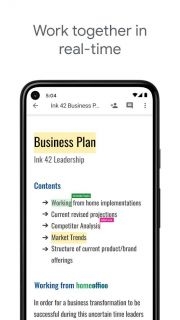
In terms of collaboration, Google Docs is very powerful. You can share documents and show them to others, or let them comment or edit them. Multiple people can work on a document at the same time, and everyone's changes are displayed in real time. There is no need to send emails back and forth, and team collaboration is smoother.
Another benefit of Google Docs is that it has powerful commenting and revision functions. You can comment in the text, tag collaborators, and even assign tasks. With the revision history, you can see who made what changes and when, and even revert to an earlier version.
There are also many add-ons available for more powerful functions. Other tools, such as a bibliography manager or flowchart creator for academic writing, can be integrated directly into Google Docs.
Another powerful feature is the research tool. With the Explore function, you can search for web pages, images, and even Google Drive files in the document, and you can cite, create footnotes, and insert images without leaving the document, making the research and writing process easier.
In terms of security, Google Docs's automatic save and backup functions are reassuring. Every time you make a change, it will be saved to the cloud immediately, and your work will not be lost due to unexpected circumstances. Google's advanced security features can also protect documents from being leaked.
Overall, Google Docs makes creating and collaborating on documents different. With an intuitive interface, powerful collaboration tools, and a variety of functions, it is a good helper for processing text. Whether you are drafting a memo, writing a novel, or collaborating on a project proposal, Google Docs can provide useful tools and flexibility to help you get the job done efficiently.
First, log in with your Google account, and you will be at the Google Docs information center.
Step 2: Create a new document. Find the "+ New Document" button and click it, or choose a preset template, such as a resume, letter, report, etc.
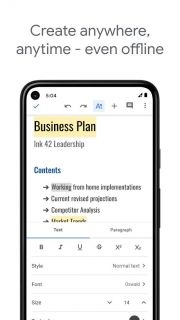
Step 3: Start writing in the new document, and use the toolbar at the top to adjust the font, size, color, and style. You can also add bullets, tables, and align text.
Step 4: Want to add hyperlinks, images, and tables? No problem, just click the "Insert Link", "Insert Image", and "Table" buttons respectively, and then follow the prompts.
Step 5: Share the document. Click the "Share" button in the upper right corner and enter other people's email addresses to invite them to collaborate. You can set whether they can edit, comment, or just view the document.
Step 6: Multiple people edit and comment in real time. Everyone changes the document together, and the changes will be displayed in real time, and everyone's cursor color is different. You can also highlight text and add comments.
Step 7: View revision history. If you want to see who changed what, go to "File"-->"Version History"-->"View Version History", there is a version list, just click it and take a look.
Step 8, try add-ons. There is "Add-ons" in the menu, click it to "Get Add-ons", these components can help you achieve more functions.
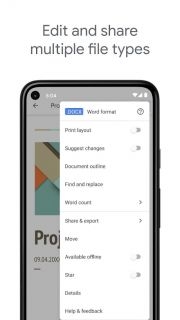
Step 9, download and print. If you want to save the document, go to "File"-->"Download" and choose a format, such as DOCX or PDF. To print, go to "File"-->"Print".
Step 10, explore advanced features. Google Docs also has voice input, translation and exploration tools to help you do more research. These features are under the "Tools" menu.
Overall, Google Docs is a great tool that combines the convenience of a word processor with the power of real-time collaboration. Whether you are doing a school project, writing a business proposal or writing a novel, Google Docs can help you get it done. I wish you happy writing and collaboration!


YouTube
ChatGPT
Google Maps
Gmail
Microsoft Outlook
Yahoo Mail
TikTok
Stardew Valley
TikTok
YouTube
Toon Blast
Disney Heroes: Battle Mode
Burger Please!
Project Makeover
Poly Bridge
GIRLS' FRONTLINE 2: EXILIUM
NARUTO X BORUTO NINJA VOLTAGE
Asphalt 9: Legends
Hunting Sniper
Advertisement
Welcome to Gameonyx.com! We have thousands of addicting pc games for you to download, and we add new downloadable games every day! Our games are all from the most popular game developers. Surely the games will keep you entertained. You can download the games to your computer first and you can play them for some time freely. Then you can buy the full version games if you like them! At Gameonyx.com we pride ourselves in serving you the newest and best pc games to download everyday so that you will not be disappointed. All our games have high quality.