Hill Climb Racing 2
Burger Please!
Asphalt 8 - Car Racing Game
TikTok
Woodle Screw Jam: Nuts & Bolts
Temple Run 2
My Talking Tom Friends 2
WildCraft: Animal Sim Online 3D
Toy Blast
Resident Evil Village
Advertisement


Have you ever dreamed of being able to manage all your email communications from anywhere, anytime, with just a mobile device? Google's Gmail app is designed to make that dream a reality, and it offers a lot more. It's more than just a simple email app, it's a powerful communication tool that exists to simplify your life.
The Gmail app brings all the best of Gmail to your smartphone. Whether you use Gmail for personal communications, work-related communications, or both, the Gmail app is perfect for your needs. It's available on Android and iOS, which means that almost all smartphone users can use the Gmail app.
With the Gmail app, you can send and receive emails anywhere, anytime, just like you do on your computer. But it doesn't stop there. The app automatically categorizes your emails into categories like primary, social, and promotions, so that important emails don't get lost in the crowd. It also automatically groups similar emails together, so you can handle all related emails at once, saving you a lot of time and energy.
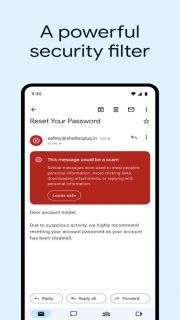
The smart features of the Gmail app are its killer feature. It comes with an advanced spam filtering system that can effectively block spam out. Its search function is also very powerful, helping you quickly find specific emails, even if they are deeply buried by other emails. You can search by sender, subject, or even keywords in the email, which makes it easier to find the information you need.
The Gmail app is also tightly integrated with Google Calendar and Google Meet. This means you can reply to meeting invitations, schedule appointments, and even join video calls directly in your inbox. What's more, the Gmail app also provides 15GB of free storage space, so you don't have to worry about running out of storage space.
Users also particularly like the customization function of the Gmail app. You can choose how to display emails, set the frequency of receiving notifications, and even customize the functions of swiping operations according to your preferences and work habits.
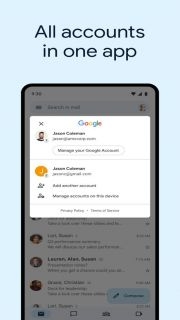
Finally, the Gmail app supports multiple accounts. This means you can easily switch between personal emails and work emails, or any other accounts you have, on the same interface.
Open the app and sign in using your Google account. If you don't have one, you can create it right there.
Upon signing in, you'll land in your inbox. Here, emails are automatically sorted into tabs like Primary, Social, and Promotions. Primary houses your most important emails, Social contains notifications from social networks, and Promotions stores deals and offers. You can swipe left or right to navigate between these tabs.
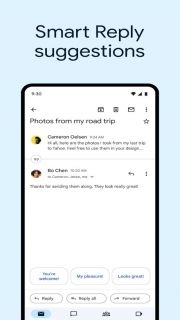
To read an email, simply tap on it. Inside, you'll find options to reply, forward, or perform other actions. The Gmail app also provides suggested replies, saving you typing time.
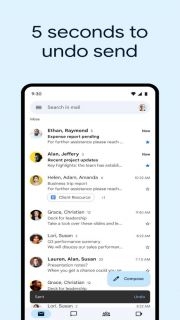
To compose a new email, tap on the "+" button. You can type in recipients' email addresses, or select them from your contacts. After crafting your message, hit the send icon. You can also attach files, images, or even doodles to your email.
Gmail app allows you to label, star, or archive emails. Labels work like folders, helping you categorize emails. Starred emails are easier to find, perfect for important emails. Archived emails are moved out of your inbox but can be found in the "All Mail" folder.
In the settings menu, you can customize your Gmail experience. Choose your theme, set your signature, decide on notification preferences, and more. You can also add and switch between multiple Gmail accounts.
Need to find a specific email? Use the search bar at the top. You can search by sender, subject, or keywords within the email. Gmail's search is powerful and can save you lots of scrolling time.
The Gmail app seamlessly integrates with other Google services. Directly from your inbox, you can respond to Google Calendar invites, create tasks in Google Tasks, or start a video call on Google Meet.
To delete an email, open it, tap on the three dots, and select 'Delete'. Deleted emails go to the 'Bin', where they stay for 30 days before permanent deletion. If you've deleted an email by mistake, you can recover it from the 'Bin'.

YouTube
Yahoo Mail
Google Docs
Microsoft Outlook
ChatGPT
TikTok
Google Maps
Toca Life World
Jujutsu Kaisen Phantom Parade
My Talking Angela 2
Monster Legends
Screw Puzzle: Nuts and Bolts
Five Nights at Freddy's: SL
Nuts & Woods: Screw Puzzle
Pou
Gmail
Don't Starve: Pocket Edition
We Are Warriors!
Screw Pin Jam Puzzle
Advertisement
Welcome to Gameonyx.com! We have thousands of addicting pc games for you to download, and we add new downloadable games every day! Our games are all from the most popular game developers. Surely the games will keep you entertained. You can download the games to your computer first and you can play them for some time freely. Then you can buy the full version games if you like them! At Gameonyx.com we pride ourselves in serving you the newest and best pc games to download everyday so that you will not be disappointed. All our games have high quality.